
Author: mwallis
Recently retired, Michael spent 30+ years in Silicon Valley as a developer and Software Reliability Engineer working with companies like Apple, Amazon, Sony, etc. He grew up in Canada, where he served as the VP and Observers Head for the London Centre of the Royal Canadian Astronomical Society during the early 1970's.
13 Dec 2023 Video
12 Dec 2023 Video
11 Dec 2023 Video
10 Dec 2023 Video
09 Dec 2023 Video
08 Dec 2023 Video
07 Dec 2023 Video
Installing IMX519 Software
So I have been struggling with properly installing the software for my camera. It’s been an ordeal.
Here’s the proper sequence and commands:
Install the allsky software:
git clone https://github.com/thomasjacquin/allsky.git

cd allsky

wget -O install_pivariety_pkgs.sh https://github.com/ArduCAM/Arducam-Pivariety-V4L2-Driver/releases/download/install_script/install_pivariety_pkgs.sh

./install_pivariety_pkgs.sh -p libcamera

./install_pivariety_pkgs.sh -p libcamera_apps

sudo vim /boot/config.txt
and add:
dtoverlay=imx519to the [All] section at the bottom.
Then:
reboot
This should allow the camera to be recognized and the install script can now be run.
More Options
So in researching a few things I came across a 2016 page with Thomas Jacquin’s original setup.
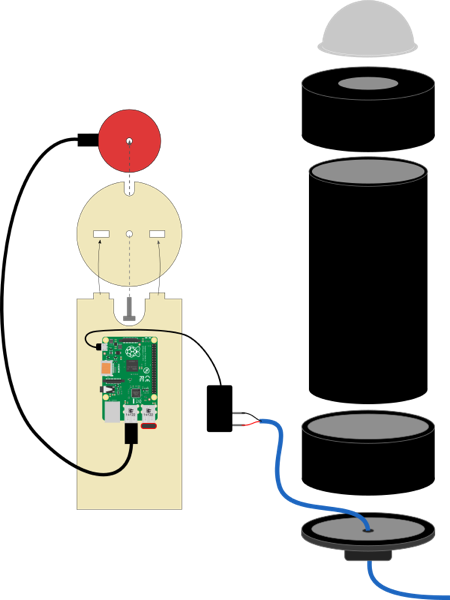
This uses a wifi dongle on an old Pi 3 for connectivity, and just runs a power wire up through the bottom. Very clean and simple.
Here’s his list of parts:
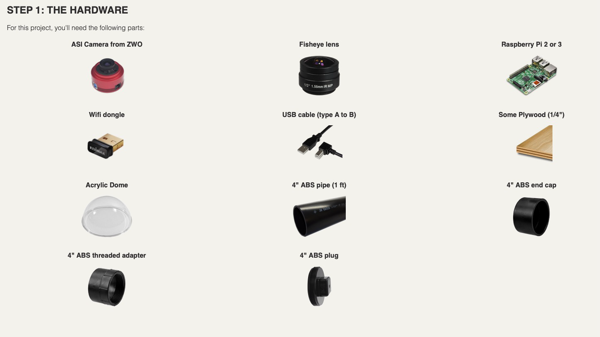
I also came across the Alaskan Astro YT video on his All-Sky Raspberry Pi. Interesting approach. I do like using the PoE Hat to get connectivity and power, which runs to a larger all-weather box that has the PoE power hub, etc. He also 3D printed his enclosure, which is cool.
https://www.printables.com/model/618541-all-sky-housing-box-for-raspberry-pi-and-zwo-cam/files